
Introduction of MCP:
MCP is an open protocol that standardizes how applications provide context to LLMs. Think of MCP like a USB-C port for AI applications. Just as USB-C provides a standardized way to connect your devices to various peripherals and accessories, MCP provides a standardized way to connect AI models to different data sources and tools.
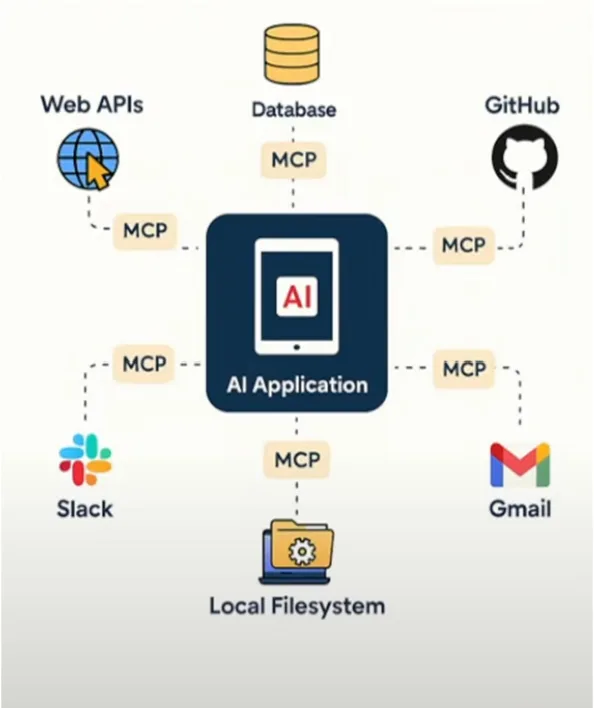
Why MCP:
Modern applications increasingly rely on Large Language Models (LLMs) that must dynamically interact with multiple tools, databases, APIs, and files. Traditional RESTful APIs struggle with this because they:
- Require manual integration and boilerplate per tool.
- Lack of context awareness and persistent state.
- Don’t support dynamic tool discovery or bidirectional communication.
Model Context Protocol (MCP) solves this by standardizing how LLM-based apps discover, invoke, and interact with tools in a structured, contextual, and modular way.
It enables:
- Dynamic, pluggable tools with self-describing schemas.
- Context sharing (memory/state) across tools.
- Asynchronous interactions, like notifications or background tasks.
- Reduced N×M complexity for tool integrations.
Learn a Few Terminologies:
Learn a few terminologies like: MCP Host, MCP Client, MCP Server, MCP Protocol, etc.
1. MCP Host:
The MCP Host is the LLM-powered application or environment (e.g., Claude Desktop, a chat UI, or IDE) that wants to access external information or tools, but cannot talk to them directly.
- Acts as the “chef” who needs ingredients (data), but doesn’t fetch them.
- Example: Claude Desktop wants to query a Postgres database.
- Hosts orchestrate the conversation and manage multiple tool interactions.
- Uses MCP Clients internally to connect to tools.
2. MCP Client:
The MCP Client is the connector within a Host that translates LLM requests into MCP messages and sends them to servers.
- Like the “waiter” taking orders from the chef.
- Example: MCP client inside an IDE that calls GitHub or file-system MCP servers.
- Maintains one-to-one connections to each MCP Server.
- Handles JSON-RPC communication (requests, responses, notifications).
3. MCP Server:
The MCP Server is a lightweight service exposing specific capabilities—such as databases, file systems, and web APIs— via MCP.
- Acts like the “supplier” who delivers ingredients/tools.
- Example: PostgreSQL MCP Server that runs SQL queries and returns results.
- Servers are self-describing, sharing schema, tools, annotations, and capabilities.
- Can wrap local resources (e.g., files) or remote services (e.g., Slack, Stripe).
4. MCP Protocol:
The Model Context Protocol standardizes how Clients and Servers communicate via JSON-RPC 2.0 over STDIO or HTTP+SSE, enabling dynamic tool use and context exchange.
- Defines messages: requests (tool calls), notifications, and responses.
- Supports tool discovery, structured inputs/outputs, and persistent context.
- Enables bidirectional communications: Servers can notify Clients or request model samples.
- Example types:
- Resources: read-only context like database views.
- Tools: actions like “run_sql” or “create_chart.”
- Sampling: The server asks the model to generate a summary of the data.
Communication between Components:
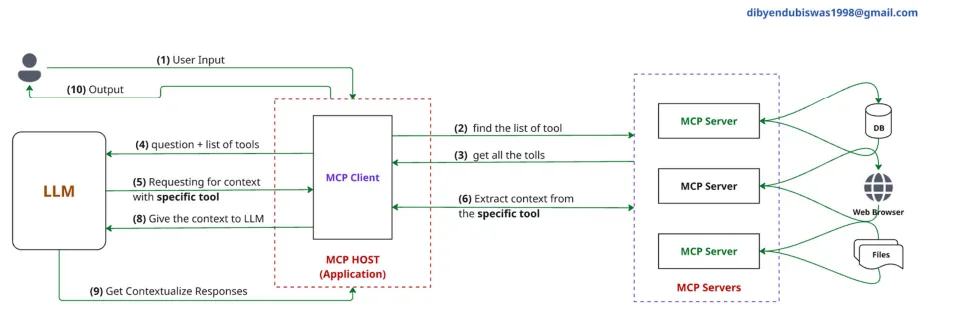
- User Input: A user provides input (e.g., a question or command) to the system.
- MCP Client requests tool list: The MCP Client (inside the MCP Host / Application) queries available MCP Servers to find the list of tools they provide.
- MCP Client collects tool descriptions: The MCP Client retrieves metadata about the available tools from all MCP Servers (e.g., what methods they support, input/output schemas).
- LLM receives questions + tools list: The MCP Client gives the LLM the user’s question and the list of available tools for reasoning.
- LLM selects a specific tool for the task: The LLM decides which tool(s) to call based on the user input and tool capabilities, then forms a tool request.
- MCP Client sends the tool call: The MCP Client forwards the LLM’s tool request (via JSON-RPC) to the specific MCP Server that hosts the tool.
- MCP Server processes and extracts context: The MCP Server performs the requested operation (e.g., DB query, file processing, API call) and generates output.
- MCP Client returns tool response to LLM: The result from the tool is passed back to the LLM for integration into its reasoning.
- LLM generates contextualized response: The LLM uses the tool output as part of its overall response formulation.
- Final Output to User: The user receives a rich, contextualized answer that combines the LLM’s reasoning and the tool’s output.
Real World Example:
Scenario: K12 Chatbot with Agentic Capabilities
You’re building an AI-powered chatbot that helps students with:
- Answering subject-specific questions (Math, Science, etc.)
- Generating MCQs or quizzes.
- Fetching summaries from textbooks.
- Displaying charts or solving equations.
Key Components in these Applications:
1. MCP Host (K12 Chatbot Application):
- This is your main chatbot interface (e.g., built with LangChain or LangGraph).
- It includes the LLM agent that interacts with students.
- It needs access to textbooks, quiz generation tools, image/video explainers, etc., but doesn’t connect directly to them.
- Example: A LangChain app with memory and state management
2. MCP Client (Connector Layer):
- Resides within the host (chatbot) and connects to different MCP Servers.
- Translates AI’s internal requests into structured MCP tool calls.
- Maintains persistent state and tool discovery.
3. MCP Servers (Your Tool Providers): You can create various servers depending on the tools you want your chatbot to access:
- Textbook Reader Server: Exposes subject-specific PDFs or markdown notes as a resource.
- Quiz Generator Server: A tool that takes a topic and returns 5 MCQs.
- Math Solver Server: Accepts math expressions, returns LaTeX-rendered solution or graph.
- Video/Animation Server: Calls external APIs to return animated video explanations.
Each of these servers self-describes its tools (e.g., generate_quiz, read_topic, solve_equation).
4. MCP Protocol:
- The standard that connects your client and servers.
- Uses JSON-RPC 2.0 over:
- HTTP + Server-Sent Events (SSE) for web-hosted tools.
- stdio for local resources or offline apps
- This enables your chatbot to:
- Discover which tools are available.
- Understand each tool’s input/output schema.
- Maintain session context (like memory of what topic is being discussed).
- Receive notifications (e.g., “quiz ready!”).
Why is MCP perfect for this?
- Dynamic tool discovery: Add new subjects/tools without coding changes in the chatbot.
- Persistent state: Student topic context and progress are retained across multiple questions.
- Security and isolation: Each tool runs in its own MCP Server (e.g., quiz generator can’t access DB directly).
- Scalable & modular: You can scale servers independently (e.g., separate quiz service per grade).
Note:
If you have 50 different tools, you do not necessarily need 50 servers, but you can, depending on your architecture and design goals. Here’s a breakdown based on Security, Isolation, and Scalability using MCP:
1. Security & Isolation:
Why separation helps:
- Each MCP Server runs in its process or container.
- If a tool is compromised, the damage is isolated.
- Sensitive tools (e.g., student_db_tool) can run in a secure environment with access control.
Example:
- Quiz_generator cannot access student_grades_tool or admin_tools unless explicitly allowed.
- You can sandbox tools that run untrusted code (e.g., code_executor_tool).
Conclusion: Creating separate servers per sensitive or critical tool enhances security and isolation.
2. Scalability & Modularity:
Why modular servers help:
- Tools with heavy load (e.g., video_generator, text_summarizer) can scale independently.
- You can deploy tool servers on different machines or even in the cloud (e.g., AWS Lambda, containers).
- Developers can work on tools independently and deploy updates without affecting the rest of the system.
Example:
- math_solver, textbook_parser, and speech_to_text_tool are hosted separately and scaled based on demand.
Conclusion: Splitting tools into modular MCP Servers allows horizontal scaling and better resource management.
Comparisons between APIs vs. MCP:
Similarities between APIs vs. MCP:
| Aspect | Descriptions |
|---|---|
| Communication | Both are mechanisms for communication between clients and services/tools. |
| Data Exchange | Both use structured data (usually JSON) to send and receive information. |
| Request/Response | Both follow a pattern where a client sends a request and gets a response. |
| Interoperability | Both allow integration of multiple services and tools, often over HTTP. |
| Can be Secured | Both support secure communication (e.g., via HTTPS or internal auth). |
Difference between APIs and MCP:
| Criteria | Traditional APIs | Model Context Protocol (MCP) |
|---|---|---|
| Designed For | Human/frontend clients (browsers, apps). | LLMs and autonomous agents. |
| Interface Type | RESTful (HTTP verbs, endpoints like /getData). | JSON-RPC method calls like run_tool, generate_quiz. |
| Tool Discovery | Manual (Swagger/OpenAPI) or hardcoded. | Automatic, self-describing tools (metadata sent by each MCP server). |
| Context Awareness | Stateless — no memory between requests. | Contextual — LLMs retain memory across multiple tool calls. |
| Protocol Structure | URI-based, with route handlers (/user/5). | RPC-like calls with tool names as methods and parameter dictionaries. |
| Dynamic Tool Calling | Not native, requires orchestration logic. | Built-in — LLMs can reason and call new tools in real-time. |
| Latency Handling | Synchronous by default. | Supports async patterns (like server push, background jobs via notify, etc.) |
| Scalability Model | One endpoint per functionality or microservice. | One MCP Server per tool or group of tools — more modular, LLM-aware. |
| Use Case Fit | CRUD apps, frontend/backend separation. | LLM agents, tool chaining, and AI orchestration (e.g., agents solving tasks using many tools). |
JSON-RPC, StdIO, and HTTP + SSE:
Here’s a clear and complete explanation of JSON-RPC, along with StdIO and HTTP + SSE in the context of Model Context Protocol (MCP) and real-world applications:
JSON-RPC:
JSON-RPC (JavaScript Object Notation – Remote Procedure Call) is a lightweight protocol used to make remote method calls using JSON. It allows a client (like an LLM or frontend) to call methods on a remote server as if calling local functions.
Key Characteristics:
- Language-agnostic.
- Uses JSON for requests and responses.
- Supports method names, parameters, and IDs.
- Supports notifications (one-way messages without expecting a response).
JSON-RPC Request Example:
{
  "jsonrpc": "2.0",
  "method": "generate_quiz",
  "params": {"topic": "photosynthesis", "questions": 5},
  "id": 1
}
JSON-RPC Response Example:
{
  "jsonrpc": "2.0",
  "result": ["What is chlorophyll?", "Name the process..."],
  "id": 1
}
Real-World Example (K12 Chatbot): A K12 chatbot wants to generate a quiz based on a topic.
Instead of calling a REST API like:
POST /api/quiz?topic=photosynthesis&count=5
The LLM uses JSON-RPC:
{
  "method": "generate_quiz",
  "params": {"topic": "photosynthesis", "count": 5}
}
Why this helps:
- The tool is self-describing.
- Easy to chain tools dynamically.
- Method-focused, not URI-focused.
StdIO (Standard Input/Output) in MCP:
StdIO is a communication pattern where the MCP server communicates via command-line input/output streams.
Example Use Cases:
- An LLM agent launches a local Python script tool (like a math solver).
- The tool receives JSON-RPC via stdin and writes responses via stdout.
Request on stdin:
$ echo '{ "method": "solve_equation", "params": {"eq": "x^2 - 4 = 0"}, "id": 1 }' | python mcp_tool.py
Tool responds on stdout:
{ "result": ["x = -2", "x = 2"], "id": 1 }
Ideal For:
- Running tools locally or in sub-processes.
- Lightweight deployment.
- CLI/terminal-based agent systems.
HTTP + SSE (Server-Sent Events):
MCP over HTTP + SSE allows clients to send JSON-RPC calls over HTTP and receive streamed responses from the server in real time.
SSE = one-way push from server to client (good for streaming answers, like LLM outputs).
Example Use Cases:
- A user requests a summary document
- The server sends updates line-by-line via SSE:
data: {"partial": "The document discusses..."}
data: {"partial": "Key points include..."}
data: {"final": "Complete summary here"}
Ideal For:
- Streaming large outputs (e.g., LLM responses).
- Web applications that need real-time updates.
- Cloud-hosted MCP servers.
Summary Table:
| Transport | Best For | Communication Pattern |
|---|---|---|
| StdIO | Local tools, CLI agents | JSON-RPC via stdin/stdout |
| HTTP + SSE | Remote tools, web apps | JSON-RPC over HTTP + streaming |
How MCP Standardizes Communication:
Model Context Protocol (MCP) defines a uniform way for LLMs and tools to interact, regardless of where or how those tools are hosted.
Key Components:
Transport Options:
StdIO (Standard Input/Output): MCP Client ⇄ and MCP Server communicate via terminal I/O streams.
When to Use:
- Local tool execution (e.g., subprocesses tools)
- Lightweight environments.
- When low-latency matters or when deploying on the CLI.
Example:
- An LLM spawns a Python tool via subprocesses
- Sends JSON-RPC to its stdin
- Receives JSON output from stdout
HTTP + SSE (Server-Sent Events): JSON-RPC over HTTP requests, with streamed responses via SSE.
When to Use:
- Remote/cloud-based MCP servers
- Need to stream long outputs (e.g., LLM completions)
- Web integrations
Example:
- MCP client POSTs {“method”: “generate_quiz”} to /rpc
- Server streams quiz questions line-by-line via SSE
When to Use Each Option:
| Scenario | Use StdIO | Use HTTP + SSE |
|---|---|---|
| Local tools | ✓ | |
| Cloud/remote tools | ✓ | |
| Streaming outputs | ✓ | |
| Web integrations | ✓ | |
| CLI/terminal apps | ✓ | |
| Low latency needed | ✓ |
Summary:
- MCP standardizes how tools (servers) describe themselves and how LLMs (clients) call them using JSON-RPC 2.0.
- It abstracts away the transport layer — whether it’s Stdio for local tools or HTTP + SSE for cloud services — enabling tool discovery, context sharing, and AI-native orchestration.
- It’s optimized for LLM-first architecture, making it scalable, modular, and contextual.
Difference between Function Call and MCP:
| Aspect | Function Call | MCP (Model Context Protocol) |
|---|---|---|
| Scope | LLM calls pre-registered functions/tools inside one API (e.g., OpenAI API) | LLM calls external tools/servers dynamically via JSON-RPC |
| Tool Discovery | Functions must be registered in the API request (no discovery) | Tools self-describe at runtime; dynamic discovery is possible |
| Execution Location | Functions handled within the API environment | Tools run anywhere (local, cloud, separate services) |
| Transport | Encoded in LLM API request/response | StdIO or HTTP + SSE for tool communication |
| State/Context Sharing | No cross-call memory (unless implemented manually) | Sessions enable context sharing across multiple tool calls |
| Flexibility | Limited to what’s embedded in the LLM provider’s API | More modular: tools live independently and can scale separately |
| Streaming & Async | Limited (depends on provider) | Built-in async, streaming via SSE |
When to use Function Call and When to use MCP:
Let’s explore when to use a Function Call or when to use MCP:
When to use Function Call:
- You want a simple integration inside your LLM API call (e.g., OpenAI, Anthropic).
- Your tools are small, deterministic, and lightweight.
- You don’t need independent deployment, scaling, or dynamic discovery.
- Example:
- Call the weather API, calculator directly within the LLM API request.
When to use MCP:
- You want your LLM to access external, independently running tools.
- You need dynamic tool chains where tools can be added/removed at runtime.
- You need modular, scalable architecture (e.g., microservices for AI agents).
- You want persistent context across tools in a workflow.
- Example:
- An agent that queries the DB, generates a report, and emails the result, all via independent MCP tools.